Can an oversized power supply waste electricity? Yes, but usually only at low load. Most modern units waste more when they run far below their rated wattage.
The real issue is efficiency, not size alone.
A PSU converts AC to DC, and its efficiency changes with load. Per 80 Plus testing, many units hit best efficiency near 50 percent load. As of 2026, that curve still matters more than the wattage sticker.
Check real draw before you buy or replace anything.
can an oversized power supply waste electricity
Yes. An oversized PSU can waste power at low load. Efficiency drops when load is too small.
Standby draw also adds waste. Measure real system draw first.
How PSU Efficiency Actually Works (The Efficiency Curve)
A power supply unit (PSU) does not waste power just because it is large. It wastes power when it works inefficiently. Efficiency is AC input divided by DC output.
The rest becomes heat.
Most units have an efficiency curve. It usually rises from low load to mid load. It may flatten or dip near full load.
So a 1000 W unit running a 150 W PC can sit in a weak part of that curve.
80 Plus tests at 10, 20, 50, and 100 percent load. Those points show where a unit performs well. A Gold unit at 50 percent load often beats the same unit at 10 percent load.
That is the key idea.
Standby power is separate. A PC that is off can still draw a few watts. That happens through the 5V standby rail.
ErP settings can reduce it.
What "Oversized" Really Means (Load Percentage, Not Watts)
Oversized means the rating is much larger than real load. It does not mean the PSU forces extra power into your PC. Your system pulls only what it needs.
Load percentage is real load divided by PSU rating. A 600 W PSU at 180 W load is at 30 percent. A 1000 W PSU at the same 180 W load is at 18 percent.
The second case can be less efficient.
Wattage rating is capacity, not consumption. An 850 W PSU does not use 850 W at idle. It only converts what the parts ask for.
The wasted part is conversion loss.
Step-by-Step: How to Check If Your PSU Is Wasting Power
- Measure wall draw with a plug-in power meter.
- Record idle, gaming, and full load numbers.
- Check the PSU label for its DC wattage rating.
- Divide real load by the PSU rating.
- Compare that percentage to the efficiency curve.
- Check standby draw after shutdown.
- Decide if a replacement saves enough money.
| Real Load | 650 W PSU | 1000 W PSU |
|---|---|---|
| 150 W | 23% load | 15% load |
| 300 W | 46% load | 30% load |
| 500 W | 77% load | 50% load |
Right-Sized vs. Oversized: A Side-by-Side Look
A right-sized unit usually runs closer to its best efficiency zone. An oversized unit gives more upgrade headroom. The better choice depends on your real load and future plans.
| Factor | Right-Sized PSU | Oversized PSU |
|---|---|---|
| Low-load efficiency | Often better | Can be worse |
| Upgrade headroom | Limited | High |
| Upfront cost | Lower | Higher |
| Heat and noise | Moderate | Varies by load |
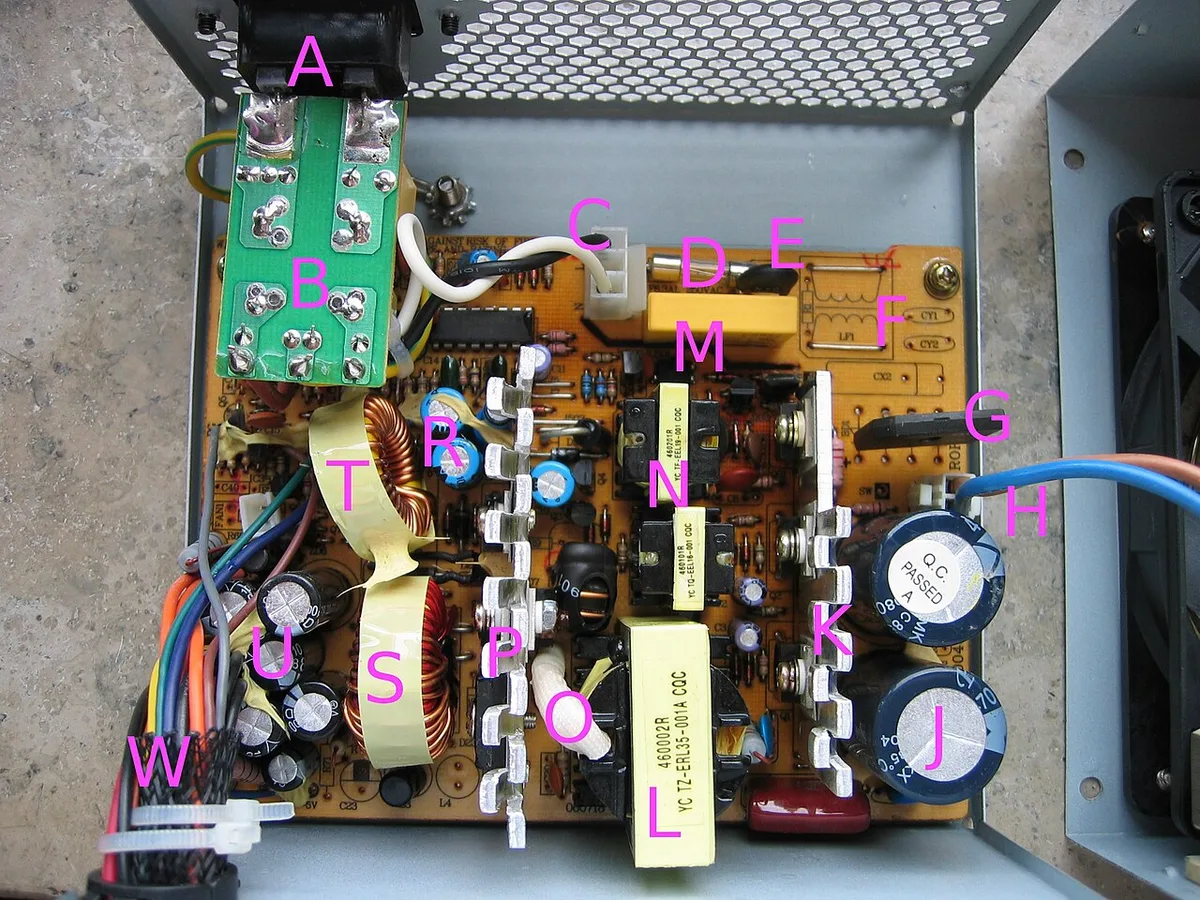
Image source: Wikimedia Commons / Hans Haase (CC BY-SA)
When an Oversized PSU Actually Makes Sense
Sometimes bigger is the right call. A higher-wattage unit makes sense when your build has real headroom needs. Future GPU upgrades are the most common reason.
If you plan to move from a mid-range card to a high-end one, the extra wattage protects you. A 750 W unit today may be too small for tomorrow's GPU. Buying once beats buying twice.
Headroom also helps with transient power spikes. Modern GPUs can briefly pull far more than their rated TDP. A PSU with extra capacity handles those spikes without tripping protection.
High-efficiency units also perform better at mid load. A Titanium unit at 50 percent load often beats a Bronze unit at the same load. So the size is not the only factor.
The efficiency tier matters too.
If your system pulls 400 W and you own an 850 W Gold unit, that is not waste. That is a healthy 47 percent load. The unit runs near its sweet spot.
Common Mistakes That Cost You Money
The biggest mistake is buying based on GPU marketing. GPU boxes list recommended PSU wattage. That number includes system headroom.
It is not your actual draw.
Another mistake is ignoring the efficiency tier. A cheap 1000 W unit can waste more than a good 650 W unit. The tier often matters more than the number.
People also forget standby draw. A PC that is shut down but still plugged in can pull 2 to 5 watts. Over a year that adds up.
ErP mode in BIOS can cut it.
Some users leave RGB and fans running at idle. Those parts add load. A 50 W idle becomes 80 W fast.
That pushes a small PSU into a better efficiency zone, but it still wastes energy.
Another error is skipping the wall meter. Guessing load from TDP is unreliable. A 65 W CPU can pull 90 W under boost.
Measure instead.
If you are planning a gaming PC memory upgrade soon, factor that into PSU sizing. Extra RAM and storage raise idle draw slightly.
What It Costs: Real Numbers and Energy Math
Cost depends on three things. Your electricity rate, your load, and the efficiency gap. The math is simple once you have real numbers.
Say your PC pulls 200 W at the wall with an old 85 percent efficient unit. That means 170 W reaches the parts. The 30 W difference is heat and loss.
Upgrade to a 92 percent efficient unit at the same load. Now you pull about 185 W at the wall. You save 15 W per hour.
At 8 cents per kWh, that is roughly 10 dollars per year.
Standby matters too. A 4 W standby draw for 20 hours a day equals about 29 kWh per year. At 12 cents per kWh, that is 3.50 dollars.
Small but real.
| Scenario | Wall Draw | Annual Cost at $0.12/kWh |
|---|---|---|
| Old 85% unit, 200 W load, 4 hrs/day | 200 W | $35.04 |
| Gold unit, 200 W load, 4 hrs/day | 185 W | $32.41 |
| Standby, 4 W, 20 hrs/day | 4 W | $3.50 |
The savings are modest for one PC. They grow if you run the system all day. A server or workstation running 24/7 sees bigger gaps.
If you are also choosing storage for a gaming build, remember that SSDs add little load. The PSU choice should focus on GPU and CPU draw.
FAQs
Does an oversized PSU always waste more power?
No. Waste depends on load percentage and efficiency tier. A large Titanium unit at 40 percent load can beat a small Bronze unit at the same load.
Size alone is not the issue.
Is a 1000 W PSU wasteful for a 300 W gaming PC?
It can be. At 300 W, a 1000 W unit runs at 30 percent load. That may sit below its best efficiency zone.
A 650 W unit at the same load runs closer to 46 percent, which is often better.
Does standby power count as wasted electricity?
Yes. Standby draw happens when the PC is off but plugged in. It powers USB charging, wake-on-LAN, and soft power.
ErP mode can reduce it to under 0.5 W.
Should I unplug my PC to save power?
It helps slightly. Unplugging cuts standby draw to zero. A switched power strip does the same job.
The savings are small per year but free.
Does PSU wattage affect my electric bill directly?
No. The bill reflects actual draw, not the rating. A 1000 W PSU on a 200 W load bills you for roughly 200 W plus conversion loss.
The rating only sets the ceiling.
Is it better to buy a bigger PSU for future upgrades?
Often yes. If you plan a GPU upgrade within two years, extra headroom avoids a second purchase. Just check that the unit still lands in a good efficiency zone at your current load.
Final Verdict: Should You Downsize or Keep It?
Keep it if your load sits in a healthy zone. If your 850 W unit runs at 40 to 60 percent load, there is no reason to replace it. The efficiency is likely fine.
Downsize or replace if your load sits below 20 percent most of the time. That is where waste shows up. A smaller, higher-tier unit may pay for itself over time.
The real answer is to measure first. Use a wall meter. Check load percentage.
Check standby draw. Then decide.
If you are building a new gaming rig and buying fresh, aim for a unit that lands near 50 percent load at your expected draw. That gives efficiency and headroom together.
As of 2026, the best PSUs combine high efficiency tiers with smart fan curves. The wattage number is only one part of the story. Load percentage and tier matter more.