A living room gaming PC is a compact computer built to sit near a TV and deliver PC gaming from the couch. It blends console-style placement with the upgrade freedom and game library of a desktop. In our research, the biggest difference is spatial, not just specs: chassis size, viewing distance, and noise matter as much as GPU power.
Manufacturer specs indicate a typical 55 to 65 inch TV is viewed from about 6 to 10 feet. That distance changes how you read text, hear fans, and manage cables. We'll walk through what it looks like, where it fits, and the mistakes to avoid.
Why a Living Room Gaming PC Is a Visual and Spatial Setup First
A living room gaming PC is not just a desk tower moved under a TV. It is a small form factor (SFF) PC, usually built in a compact case, placed where people walk, sit, and watch. The room shapes the build.
Heat, noise, and cable runs become daily concerns, not lab specs.
In our research, the strongest setups look deliberate. They sit flat on a shelf, face forward, and keep vents clear. They do not block a soundbar or fight a TV stand.
Aggregate user reviews report that noise is the first thing people notice from the couch. A GPU that sounds fine at a desk can feel loud at 8 feet.
This is why visuals matter. You see the case every day. You see dust on horizontal vents.
You see RGB in a dim room. A good living room build looks like part of the entertainment center, not an afterthought.
If you are comparing builds, start with a mid-range gaming PC for a sense of balance. Then shrink that idea to fit your shelf. The goal is not maximum size.
The goal is a clean, quiet box that disappears into the room.
What a Living Room Gaming PC Actually Looks Like on the Shelf
Chassis Shape and Orientation
Most living room gaming PCs use a horizontal layout. The case looks more like a console or a small stereo component than a vertical tower. Some models stand upright, but horizontal placement is easier on a TV stand.
Case volume is the key visual clue. Many SFF cases fall around 7 to 15 liters. That is small enough to fit beside a receiver or under a TV.
GPU length and CPU cooler height still decide what fits. Manufacturer documentation should be checked before buying parts.
Front I/O and Cable Visibility
Front ports matter more here. You want USB, audio, and power buttons within reach from the couch. Rear ports should face the wall or cabinet back.
Cables should be short, neat, and routed behind the stand.
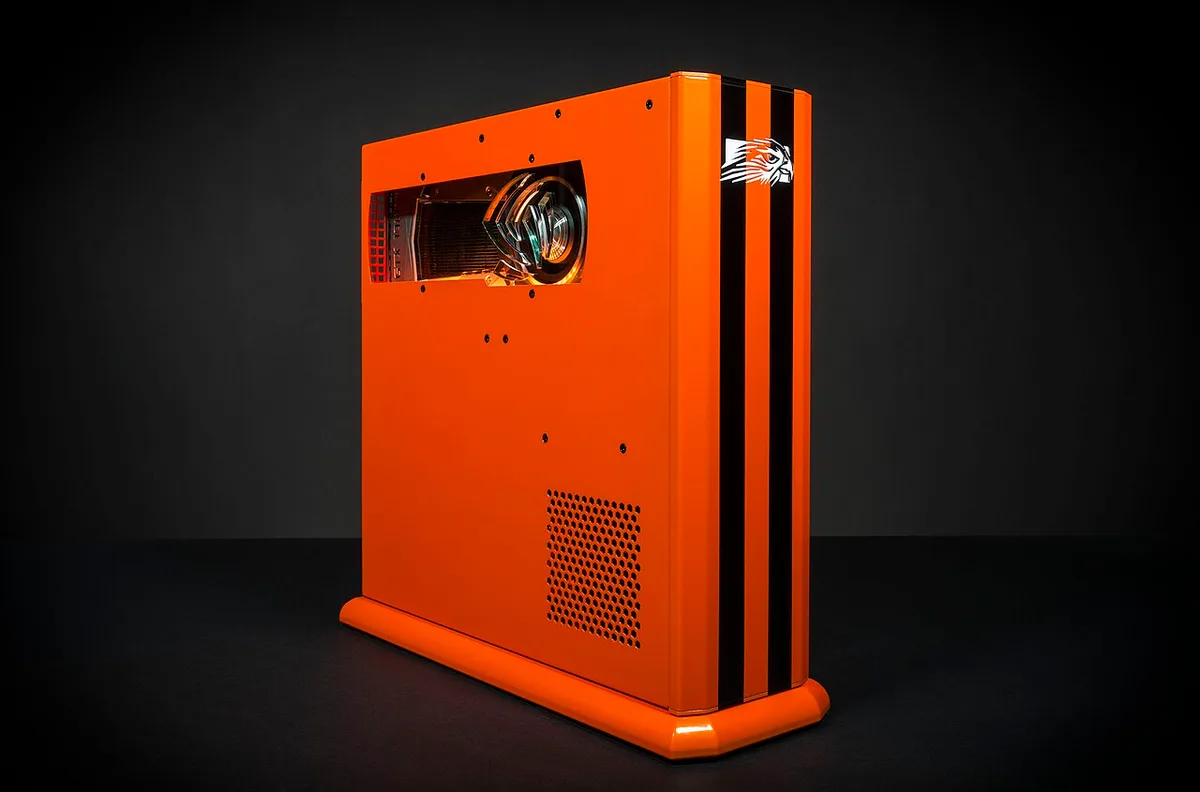
Image source: Wikimedia Commons / Falcon Northwest (CC BY-SA)
A messy cable bundle is the fastest way to make a clean setup look temporary. Use right-angle HDMI adapters if the TV port is tight. Keep Ethernet or power bricks off the floor when possible.
If you are new to parts, beginner-friendly hardware basics help before you plan the case.
Key Visual Identifiers: Spotting One at a Glance
You can usually spot a living room gaming PC by a few visual traits. It is compact, horizontal, and placed close to the TV. It often has a muted finish, not a tall glass panel.
It may have subtle lighting instead of bright RGB.
Common identifiers include:
- A case under about 15 liters
- A horizontal orientation on a shelf
- Front USB and audio within couch reach
- Short cable runs to the TV
- A controller, not a mouse, nearby
- Quiet cooling with larger, slower fans
- Vent clearance on at least two sides
Not every compact PC is a living room build. An entry-level machine can still be a desk tower. The difference is placement and use.
If it lives under a TV and runs from a couch, it belongs in this category.
Visuals also reveal comfort. Small text on a 4K TV is hard to read at 8 feet. Good setups use UI scaling, Big Picture mode, or a controller-first launcher.
The PC itself may look simple, but the screen experience is the real test.
How It Fits Into Your Living Room: Placement and Viewing Distance
Placement decides whether the build feels natural. A living room gaming PC needs airflow, access, and a safe power path. It should not sit inside a closed cabinet unless the cabinet has strong ventilation.
Manufacturer specs often call for several centimeters of clearance around vents.
Viewing distance also changes the setup. A 55 inch TV at 7 feet feels very different from a 75 inch TV at 10 feet. Text, HUD elements, and menu scaling matter more at couch distance.
| TV Size | Common Viewing Distance | Practical Note |
|---|---|---|
| 55 inch | 6 to 8 feet | Text scaling may need adjustment |
| 65 inch | 7 to 9 feet | Good balance for most living rooms |
| 75 inch | 9 to 12 feet | HUD and subtitle size become important |

Image source: Wikimedia Commons / Marcus Quigmire from Florida, USA (CC BY-SA)
For TV gaming, HDMI 2.1 matters when you want 4K at 120Hz. The HDMI Licensing Administrator defines the standard. Your TV, cable, and GPU all need to support it.
VESA mount standards can also help if you mount the PC behind a TV, but airflow must stay safe.
If you use an AV receiver or soundbar, route audio early. Test input switching before final cable management. How components work together is useful when planning power, display, and audio paths.
Common Visual Mistakes That Ruin a Living Room Gaming PC Setup
The first mistake is hiding the PC in a sealed cabinet. It looks tidy, but heat builds fast. Fans then spin harder and get louder.
Leave vents open and measure clearance before final placement.
The second mistake is cable clutter. Long power bricks on the floor create trip hazards. Loose HDMI cables pull ports over time.
Route cables along the stand back and secure them with simple ties.
The third mistake is choosing a case that looks good but cools poorly. Glass panels and tight vents can trap heat. A mid-range gaming PC may be powerful, but the case still needs airflow.
Visual appeal should not override cooling.
The fourth mistake is ignoring the screen. A beautiful PC does not fix tiny UI text at 9 feet. Use TV Game Mode, reduce input lag, and adjust scaling.
Controller navigation should feel natural, not like a mouse on a couch.
The fifth mistake is poor front access. If the power button is hidden, daily use becomes annoying. Keep ports reachable.
Keep the case stable on the shelf. If it slides, use rubber feet or a shelf mat.
A living room gaming PC should feel easy to live with. It should start fast, stay quiet, and look intentional. When those pieces work, the setup stops feeling like a compromise.
Living Room Gaming PC vs. Console vs. Desk PC
A living room gaming PC sits between a console and a desk PC. It gives you PC flexibility in a console-like spot. A console is simpler and cheaper upfront.
A desk PC is easier to build, cool, and upgrade.
| Option | Best for | Main tradeoff |
|---|---|---|
| Console | Easy couch gaming | Fixed hardware |
| Desk PC | Max performance and upgrades | More space and noise |
| Living room PC | PC library on a TV | Tighter cooling and layout |
Choose a living room PC if you want mods, emulators, and multitasking on a big screen. Choose a console if you want the lowest cost and least setup. Choose a desk PC if you want the quietest high-end build and easy upgrades.
If you are sizing expectations, mid-range specs give a useful baseline. For a broader gaming PC versus regular desktop comparison, the same tradeoffs apply, just in a smaller case.
Specs That Actually Matter for Couch and TV Gaming
Not every spec matters equally at couch distance. Noise and display support often matter more than peak frame rates. A loud 300W GPU can ruin a movie night.
A quieter card with sensible settings may feel better every day.
The specs worth checking first are simple. HDMI 2.1 matters for 4K at 120Hz on supported TVs. GPU length must fit the case.
CPU cooler height must clear the side panel. Case volume and vent clearance decide heat. Power draw affects both heat and outlet load.
Wi-Fi 6E or Ethernet helps with downloads and streaming. Storage matters because modern games are large.
| Spec | Why it matters in a living room | Practical check |
|---|---|---|
| HDMI 2.1 | Enables 4K at 120Hz on supported gear | Match TV, cable, and GPU |
| Noise level | Audible from couch distance | Test under load, not idle |
| GPU length | Decides SFF case fit | Check case documentation |
| Power draw | Affects heat and PSU choice | Know idle and load watts |
As of 2026, many TVs support 4K at 120Hz and VRR. Still verify the exact ports and modes. What drives gaming PC performance helps separate real bottlenecks from marketing numbers.
What a Living Room Gaming PC Costs: Budget to Premium
A living room gaming PC can cost more than expected. Small cases, SFX power supplies, compact coolers, and custom cables add up. Space is tight, so parts must be chosen with more care.
| Tier | Typical total | What to expect |
|---|---|---|
| Budget | $900 to $1,300 | 1080p or 1440p, modest case |
| Mid | $1,400 to $2,000 | 1440p or 4K, quieter cooling |
| Premium | $2,100 and up | 4K at 120Hz, high-end SFF parts |
Budget builds work well if you target 1080p or 1440p. Mid builds usually give the best balance of noise, size, and performance. Premium builds need careful airflow and often cost more per frame.
How long a gaming PC lasts is worth reading because living room systems run warm and may need earlier fan service. Keep a surge protector, avoid overloaded outlets, and leave upgrade room.
Frequently Asked Questions
Is a living room gaming PC better than a console?
It depends on what you value. A living room PC gives you a large game library, mods, emulators, and upgrade options. A console gives lower cost, simpler setup, and less maintenance.
If couch convenience matters most, a console is fine. If PC games on a TV matter most, the living room build wins.
Can a small PC run 4K games on a TV?
Yes, with the right GPU and settings. HDMI 2.1 helps for 4K at 120Hz on supported TVs. Upscaling features like DLSS or FSR can improve smoothness.
You may still need to lower some graphics settings for stable frame rates.
Do living room gaming PCs overheat in cabinets?
They can. Closed cabinets trap heat and raise fan noise. Leave vent clearance and test temperatures after final placement.
Manufacturer guidance often calls for several centimeters of space around vents.
Is a living room gaming PC noisy?
It can be. Small cases have less airflow, so fans work harder. Larger slower fans and sensible power targets help.
Test noise from your actual couch distance, not from beside the case.
Can I use a keyboard and mouse on the couch?
Yes, but it can feel awkward. Lap desks and wireless sets help. Most living room setups work best with a controller for navigation and a keyboard only for specific games.
Final Verdict: Is a Living Room Gaming PC Right for You
A living room gaming PC is right for you if you want PC games on a big screen and can manage space, cooling, and cables. It is less ideal if you want the simplest, cheapest, or quietest setup. Start by measuring your shelf and TV ports.
Then choose a case that fits before choosing parts. What makes a PC capable of running modern games can help set realistic expectations before you buy.