What is vapor chamber cooling in gaming laptops? It is a flat, sealed metal chamber that spreads heat away from the CPU or GPU. The heat then travels into fins and fans.
You usually cannot see it from the outside.
Manufacturer specs often describe it as two-phase cooling. The chamber holds a tiny amount of fluid in a vacuum. Heat turns that fluid into vapor, then it condenses back into liquid.
That cycle helps lower hot spots during long gaming sessions. As of 2026, this design shows up most often in premium thin-and-light gaming laptops.
what is vapor chamber cooling in gaming laptops
A vapor chamber is a flat, sealed metal plate inside a laptop. It spreads heat from the CPU or GPU across a larger area. A small amount of fluid changes to vapor and back.
That cycle moves heat toward the fans and fins. It helps reduce hot spots during gaming.
Why Vapor Chamber Cooling Is Hard to Spot From the Outside
Most gaming laptops look similar from the outside. The cooling hardware sits under the keyboard deck and above the battery. You may only see vents, fans, and a few screws.
That hidden layout makes vapor chambers easy to ignore. The real clues are inside the chassis or in teardown photos. A wide, flat plate near the CPU and GPU often signals one.
Marketing names do not help much either. Brands may call it "vapor chamber cooling," "liquid metal cooling," or "advanced thermal design." Those labels can describe different parts of the same cooling system.
So you need to look at the internal layout. A vapor chamber is not a glowing part or a visible liquid loop. It is usually a thin copper plate with a subtle raised profile.
How a Vapor Chamber Moves Heat in a Gaming Laptop
Heat starts at the CPU or GPU die. Thermal interface material transfers that heat into the vapor chamber base. The base is the evaporator, where liquid fluid absorbs heat and turns into vapor.
The vapor spreads across the chamber. It carries heat toward cooler areas, often near the fans and heatsink fins. There, the vapor condenses back into liquid and releases heat.
Capillary action pulls the liquid back to the hot zone. The wick structure makes that return flow possible. The cycle repeats without a pump, which is why the system stays compact.
This two-phase process can spread heat more evenly than a small contact point. It does not remove heat by itself. Fans and heatsink fins still do the final heat rejection.
What a Vapor Chamber Looks Like Inside the Chassis
Inside the chassis, a vapor chamber often looks like a thin copper plate. It may sit directly over the CPU and GPU. Heat pipes or fins connect to its edges.
The plate can be larger than one heat pipe footprint. That wider contact area helps spread heat before it reaches the fans. In compact laptops, the chamber may be only a few millimeters thick.
Evaporator, Condenser, and Wick Structure
The evaporator is the hot side of the chamber. It sits closest to the processor and absorbs heat. The condenser is the cooler side, where heat leaves the chamber.
Between them, the wick structure moves liquid back to the hot side. Manufacturer documentation often describes this as sintered copper powder or micro-grooved channels. That wick is the part that keeps the cycle stable.
A poor wick design can limit performance. If liquid cannot return fast enough, the hot side dries out. That is one reason chamber quality varies between laptop models.
Vapor Chamber vs Heat Pipes in Gaming Laptops
Heat pipes are narrow tubes that move heat along a line. A vapor chamber is a flat plate that spreads heat in two directions. Both use phase change, but their shapes affect cooling behavior.
A vapor chamber can cover a broader hot spot. A heat pipe can route heat to a distant fin stack. Many gaming laptops use both in the same cooling assembly.
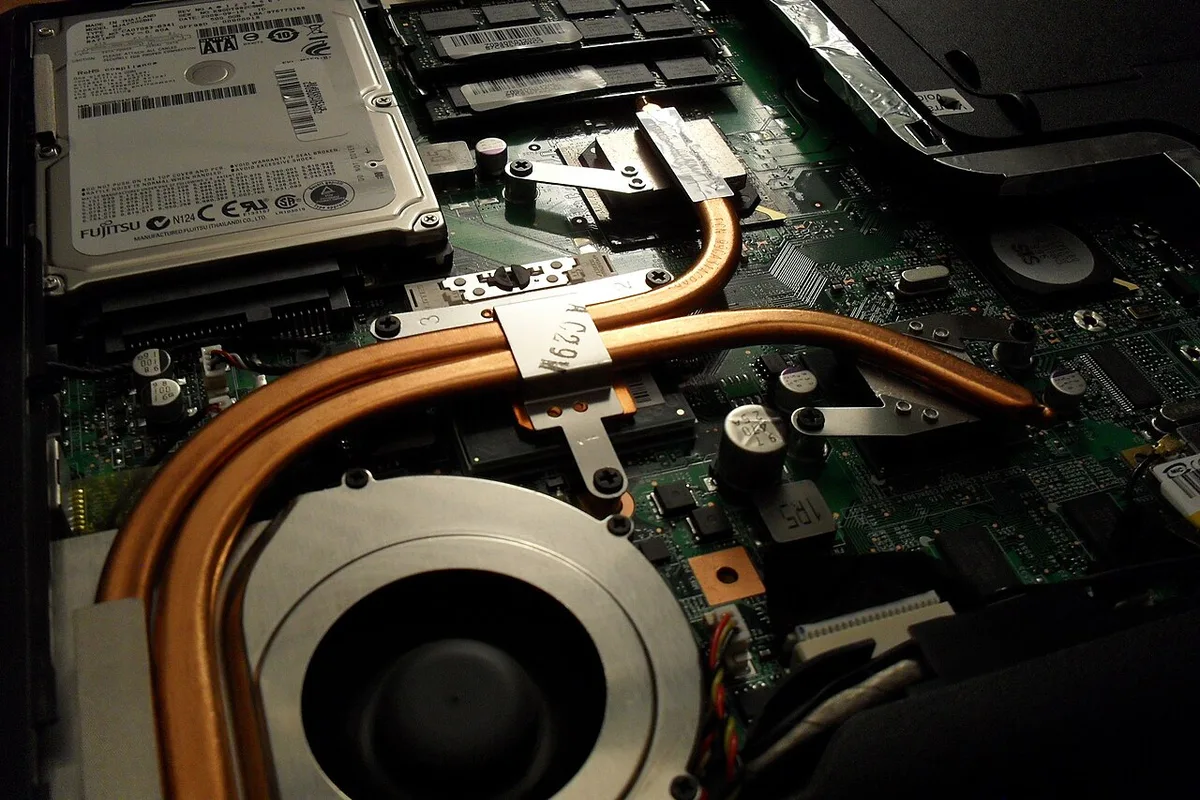
Image source: Wikimedia Commons / Kristoferb (talk) (CC BY-SA)
| Feature | Vapor Chamber | Heat Pipe |
|---|---|---|
| Shape | Flat plate | Narrow tube |
| Heat spreading | Wide and even | Directional |
| Best use | Hot CPU/GPU zones | Routing heat to fins |
| Common pairing | Often used with heat pipes | Often used with vapor chambers |
If you are comparing two laptops, do not judge cooling by one part alone. Fan size, fin density, vent design, and thermal paste all matter. Aggregate reviews report that a well-tuned heat pipe system can still outperform a weak vapor chamber layout.
Where Vapor Chamber Cooling Helps Most
Vapor chambers help most when heat is concentrated in a small area. Thin gaming laptops have limited space for large heatsinks. A flat chamber can spread that heat without adding much height.
They also help during sustained gaming. Short bursts may not show much difference. Longer sessions can reveal better temperature stability and less thermal throttling.
High-wattage CPUs and GPUs benefit too. More heat needs a wider spreading path. A chamber can reduce hot spots before fans ramp up.
You may notice steadier boost clocks in reviews. That is a practical sign of better thermal headroom. It does not always mean lower fan noise, but it can help.
If your laptop runs hot, learn the cause first. Our guide on why laptops get hot covers common heat sources. It pairs well with simple cooling fixes.
How to Tell If Your Laptop Uses a Vapor Chamber
Check the manufacturer's spec sheet first. Look for terms like "vapor chamber," "two-phase cooling," or "liquid metal." Then compare the internal photos in teardown videos or service manuals.
A wide copper plate over the CPU and GPU is the main visual clue. Heat pipes alone look like thin copper tubes. A chamber may have a raised or slightly domed center.
Do not rely only on marketing claims. Some laptops use a small vapor chamber in one area and heat pipes elsewhere. Others use a large chamber across both processors.
You can also monitor temperatures during gaming. Lower hot spots and steadier clocks suggest better spreading. For safe ranges, see safe GPU temps and safe CPU temps.
If temps spike fast, check for thermal throttling. It often points to a cooling bottleneck. How fans work can also explain what happens after heat leaves the chamber.
Common Visual and Buying Mistakes
Many buyers assume a vapor chamber guarantees cooler temperatures. That is not always true. Heat pipes, fan design, and vent layout matter just as much.
Marketing names create confusion. One brand may call a small plate a vapor chamber. Another may use the same term for a full copper spreader.
The labels do not tell you the actual size or coverage.
A common mistake is judging cooling by the spec sheet alone. A laptop with a vapor chamber but weak fans can still run hot. Dust buildup and poor vent placement can erase the benefit.
Another mistake is ignoring maintenance. Thermal paste dries out over time. Fans clog with dust.
A chamber cannot fix those issues.
Buyers also overlook TDP limits. A high-wattage GPU in a thin chassis may still throttle. The chamber helps, but it has thermal limits.
When comparing laptops, look at sustained performance tests. Aggregate reviews often report real temperatures under load. Those numbers matter more than cooling buzzwords.
Maintenance, Repaste, and Long-Term Cooling
Vapor chambers need little direct maintenance. They are sealed units. You cannot open them or refill them.
The surrounding parts still need care. Dust blocks airflow. Fans lose efficiency.
Thermal paste degrades after years of heat cycles.
Repasting can help if temperatures rise over time. Manufacturer service manuals may show the correct paste and mounting pressure. Follow those instructions to avoid damage.
Fan curve tuning is another useful step. You can raise fan speeds earlier in the load cycle. That reduces peak temperatures before throttling starts.
Ventilation clearance matters too. A blocked vent traps heat inside the chassis. Use a hard, flat surface and keep vents clear.
If cooling worsens suddenly, check for dust and paste issues first. Loud fan fixes can also reveal airflow problems. Fan speed control helps you tune the response.
Long-term, a clean system with good paste lasts longer. The chamber itself usually outlasts the laptop. The cooling system around it needs regular attention.
FAQs: Vapor Chamber Cooling in Gaming Laptops
Does a vapor chamber replace the fans?
No. A vapor chamber spreads heat. Fans and heatsink fins still remove it from the laptop.
Both parts work together.
Are vapor chambers better than heat pipes?
Sometimes. A chamber spreads heat in two directions. Heat pipes move heat along a line.
Many laptops use both for different zones.
Can I upgrade my laptop to a vapor chamber?
Usually no. The chamber is built into the cooling assembly. Swapping it requires a custom heatsink and precise mounting.
That is not a standard upgrade.
Do vapor chambers leak?
They should not. They are vacuum-sealed metal plates. A leak is rare and would mean a manufacturing defect or physical damage.
Does liquid metal work with vapor chambers?
Yes. Some laptops use liquid metal as thermal interface material. It sits between the processor and the chamber base.
It can improve heat transfer but requires careful application.
How long does a vapor chamber last?
It typically lasts the life of the laptop. The sealed design prevents fluid loss. Other cooling parts wear out first, like fans and thermal paste.